It must seem to my regular readers (and thank you by the way~XXOX) that I get on a subject and I cannot let go of it - well most of the time, I do it on purpose. The subjects have so much information that I think maybe you are like me, you can handle it best in "bite sized" pieces. Also you have a life and don't sit and stare at a computer all day clicking links that are supposed to save you from the ruins of technology!
How much can you learn at "one sitting"? How much time do you have for "one sitting"?
I have been writing about backups and online storage options lately. Well, in the past week, I have had 2 friends tell me random scenarios about their cell phones. Both of these phones are older models and both of them are loaded with numbers - or in the case of one friend " WERE LOADED" with numbers. Let's concentrate on that one.
It is beautiful weather here in Maine and my best buddy was fishing with her brother and as she was getting out of the boat her phone took a dive into the Lake. (UGH!) Dead Phone. They found it, but took to the folks at Central Maine Wireless and it was confirmed.
I have been lucky to have the folks at Central Maine Wireless look out for me and protect me from myself. They know me. They know that I lead an active lifestyle, my phone may go flying off the roof of my car because I am late for a meeting and forgot it there or I dropped in the woods when I am out hunting with my dogs. And if there is one thing you learn from this post, is that. Find a local provider that keeps YOUR needs in mind, suggests things that make sense without selling extra "goodies" you have no need for. Seriously, I don't know what I would do without them.
A few months ago, they suggested to me My Contacts backup. And Paul set it up for me in 5 minutes. You can do it yourself too, but like I said, "they know me," and they know I need the extra attention. Each day at noon (or whenever YOU decide) AUTOMATICALLY it backs up all your information on your phone to a remote server and you don't have to think about it! If you have a call or you need to use your phone at the scheduled time, it wont interfere. And if something ever should happen to your phone, then your new phone can be loaded quickly with the data from your old phone from the remote server that has it.
If you are like my friends and have an older phone you can still protect your data by going to this link: Click here.
But like everything, this is about planning ahead. You don't buy insurance for your car because you KNOW you are going to have an accident, you buy insurance IN CASE you have an accident, the data in your cell phone is the same and you should never have to figure this it out when it is gone.
Wednesday, September 10, 2008


Friday, September 5, 2008
"My computer crashed and I started crying - My whole LIFE is in there!"
The other day one of my buddies called me out of breath and left a message on my voice mail. "OH Kelly, I don't know what to do..." the rest of what she said is the title of this blog entry. When I called her back, she was still in panic mode. Did I know anybody that could rescue her data from her computer? She took it to some computer guys down the road and they couldn't retrieve anything from the drive, they suggested she send it away.
She wanted me to tell her something I couldn't. She owns her own business and she is right, her life IS in that computer.
So I said, "You have a backup, right?"
She said, "C'mon that was what my sister asked me." (I don't even know her sister.)
Of course this means, "No."
Don't let this be you. Even if your whole life isn't on your computer perhaps some other important stuff is. Photos, presentations, emails, stuff that you would miss if something happened. Stuff you couldn't recreate or would take forever to recreate. But you know this all ready - so how many of you back things up?
With me, my rules, are pretty straight forward. It has to be simple and it has to remember things for me - cause I don't stop and think, "When did I back this thing up, last?"
Since I have a MAC, I use the Apple utilities on the website, I can schedule the back up as well as store things remotely, which is pretty darn handy when I am on the road or I don't have my computer with me, I can store email contacts and calendars too. Before I back up, "it" asks me if I want it to. So if I am going out to an appointment and don't have the time for it to happen right then, I click "NO THANKS" - simple.
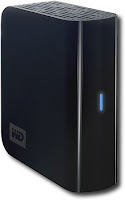
But also I am learning I don't want EVERYTHING on my computer ALL the time and I am not connected to the internet ALL the time, so again I went to Best Buy - I know, but it is MY PLACE that I like to go- and for less than a hundred dollars (they are on sale now) - I bought a Western Digital - My Book Essential 500GB External Hard Drive. 500 GB! WOW! They have all sizes for more or less storage.
I can drag photos over to it, I can save my tunes to it and back up to it all in one compact thing that looks just like a book. This helps my computer from getting bogged down with photos from 2006! I still want them, but I dont NEED 3,116 photos on my computer - which reminds me - time to move some over to "My Book"!
Don't take chances on the next lightning storm or a computer virus, or just a dead drive - you will spend a lot more than $100 rebuilding your life!
Tuesday, September 2, 2008
Web Browsers
Okay, if you never have turned on a computer or never listened to the news, you may never have heard the name "GOOGLE." So if you fall into one of the above categories, this post isnt for you and probably none of my posts are for that matter.
We all know when GOOGLE does something, they do it BIG !
Since I don't live under the veil of most developers and don't really see this stuff until it is being used, I find out about it when you do. Today is the launch date for GOOGLE's browser - CHROME. (Chrome is only available to date for PC's since GOOGLE is going after the big Microsoft market share.) If you are unfamiliar with what a browser is, Alan from my company wrote a great post a while ago and if you click on this link, you can read it here.
I personally, TODAY am a FIREFOX user. I have a lot of friends that use PC's and MAC's and they have turned to Firefox from Internet Explorer because of all its security flaws and other issues. MAC or other Linux users (these are the real geeks) will have to wait for their own GOOGLE CHROME.
Statistics say that about 75% of browsing (down from 88% last year) is done with Internet Explorer so there are a lot of people out there still using it, perhaps because they do not know they have other BETTER and safer alternatives.
I am looking into the CHROME browser and here is a link if you are so inclined to check it out yourself. This is a Barron's post NOT a way to download the software - I am just researching it and I will keep you posted on "if and when" there is a GOOGLE CHROME for MAC and I decide to change!!
But those mavericks out there - certainly comment on your PC experience if you decide to take the plunge!
We all know when GOOGLE does something, they do it BIG !
Since I don't live under the veil of most developers and don't really see this stuff until it is being used, I find out about it when you do. Today is the launch date for GOOGLE's browser - CHROME. (Chrome is only available to date for PC's since GOOGLE is going after the big Microsoft market share.) If you are unfamiliar with what a browser is, Alan from my company wrote a great post a while ago and if you click on this link, you can read it here.
I personally, TODAY am a FIREFOX user. I have a lot of friends that use PC's and MAC's and they have turned to Firefox from Internet Explorer because of all its security flaws and other issues. MAC or other Linux users (these are the real geeks) will have to wait for their own GOOGLE CHROME.
Statistics say that about 75% of browsing (down from 88% last year) is done with Internet Explorer so there are a lot of people out there still using it, perhaps because they do not know they have other BETTER and safer alternatives.
I am looking into the CHROME browser and here is a link if you are so inclined to check it out yourself. This is a Barron's post NOT a way to download the software - I am just researching it and I will keep you posted on "if and when" there is a GOOGLE CHROME for MAC and I decide to change!!
But those mavericks out there - certainly comment on your PC experience if you decide to take the plunge!
Friday, August 29, 2008
OK -LAST post about iPODS...for a while

You are sick to death of hearing about my love affair with the iPOD - but has it made you go get one yet?
I just wanted to end this string of posts about iPODS and ways that you don't have to be anti-social to have and to USE them and a few inexpensive things you can get to really make it part of your life as opposed to something you plug into your ears and block out the rest of the world. Thought it would make sense to have these thoughts reasonably close together, so you can easily find them.
So, here is a quick post about an iPOD adapter that you can plug into your car and play through your car speakers. Actually this particular one that I have is made by BELKIN, (from Best Buy of course), picks an unidentified radio signal, you tune your tuner to that station and your iPOD actually goes through that frequency while the sound comes out of your speakers as if it were on the radio. PLUS this one I use charges your iPOD at the same time.
Remember the days of the portable CD player that had a little fake tape that you put in your cassette player in your car? If you still have a cassette player in your car and have been wondering what to do with that "dummy tape", just plug the fake cassette into the player, then the little gizmo that you used to plug into the CD player, plug that end into the headphone jack of your iPOD. It doesn't charge the iPOD, but it plays great just the same.
So enough about iPODS, atleast for a while, I promise!!
Tuesday, August 19, 2008
More on iPODS

I know, I know you just think these things are gadgets that encourage anti-social behavior in public places and I cannot say that I blame you. When your kids "tune you out", when that hot guy at the gym "tunes you out," you look at them head on and they all have earphones in their ears and they are paying attention to IT and NOTHING else that is going on in the real world. NOTHING! So you hate iPODS.
It is a myth that you have to be anti-social to really USE an iPOD. I had a recent post about why I like them and how the average 40+ "Jane" or "Joe" can make real use of them. For stuff REAL people like us- like, you know, learning a language, listening to that book in the car you never had time to read. Click here to check that one out.
There are several things - none of them very expensive that can help you remove the anti-social piece from iPODS I promise it can work for you and easily!
SPEAKERS! Now here is a way to use your iPOD like a stereo. Remember it is better than carrying that stupid boom box that you finally embraced after the "Let's Get Physical" era! Or those books of CD's and you never have the one you really want to listen to!
Just like me, you are probably not an isolationist. You want to play your music or books so everyone can hear it. Or so you can cook dinner and listen without headphones on. There is also have a way to plug it into your iPOD into your car speakers and everyone in your car can hear it.
I went to Best Buy yesterday and found these speakers with the help of some very nice people there. I really like a "techie-type" store where I enter the place and there is somebody as old or OLDER than I am as a greeter. Then when I get to the area someone that actually cares about what I am looking for and doesn't try to sell me something I am not looking for and don't need.
I was looking for three things:
- Sound Quality
- Battery Power for when I take it on the road
- Portability, easy to carry and safe to travel - doesn't break!!
My pick for speakers is the Sonic Impact. (as pictured above) It is perfect and you need to get one. You can tuck it away, take it to camp and share your music or take it on a picnic. The hardest thing about it is you need to keep it from your kids! They will take it to the beach and fill it with sand.
Monday, August 11, 2008
Photo Sharing, Exchanging, Printing and Storing

Like you, I have many people in my life that love to send me photos. These photos come in all sizes, shapes and of course quality. But when was the last time someone sent you a snapshot that WASN'T a Christmas Card?
I remember my mom's Kodak Extralite 110 Camera. When the flash was turned on, you could hear the sound of it coming up to speed. I think there were more pictures taken of us swimming and at camp on this camera with a finger in the viewfinder that anyone wants to count! Lots of photos that came back from the developer that had to be thown out.
There are digital cameras, tons and tons and I am not going to discuss all the types of them out there, there are plenty of websites and information for that.
What I want to talk about is the photos themselves. These are memories and worth much more than the money is costs to protect them. If you have a fire, flood or ex-spouse in your life you come to realize how important they can be. How you store them, how you share them and how you print them, needs to be easy, reliable and safe.
If you don't have consistency in photo sharing and storage or don't like how anyone else that you know works, then here are some questions you may want to ask yourself before you look at other options.
- How many photos do I want to save in one place?
- How long do I want them to be saved there?
- How much memory do I have in my computer?
- Do I consistently "back-up" my computer or will I save them on CD's?
- Do I want to use this photo storage area to generate gifts - calendars, mugs, t-shirts to send to my friends?
BOTH?
Some services allow you to save so many (depends on space) and then charge you a fee when you exceed the free space limit.
Photo Storage and Sharing:
Sending a bunch of photos via email is easy but tricky, since most photos are quite large as well as sometimes these messages get refused all together or sent to a SPAM file.
If you have a friend, a child or somebody in your life that uses a certain service, likes it and can help you learn how to use it, then it may not be a bad idea to use the same one they do, you can be part of the same network and you can help each other use all the whiz bang features that are part of the service.
Online Photo Services can be presented a few different ways.
First way, (I would never recommend this one) is a software program to add on to your computer, I don't recommend it because it means all your memories are trapped in a box that can be struck by lightning, flooded in your basement, invaded by a virus or just slow down everything else you are trying to do on your computer. Your computer has to churn through these photos plugging up your drive. NOT to mention if this is your WORK computer and not your own computer!
If you still want to store them locally, save them off to a hard drive - this is the one I use it is from Best Buy and it hold 500GB!! Photos are big and for $99 bucks it is worth it. You can keep them in one place, but it really isnt perfect for sharing them the way photo services are.
Second way: Is the external software service - or some call it "web-based" and all of them I know of allow for storage, sorting by multiple albums, searchable key words and the ability to invite people to view or to keep your photos private.
You can access your photos with your user name and password from anywhere you have internet access. It does not have to be on your OWN computer.
I started using webshots, which I just realized I have been using it since 2002 and have multiple albums with a bunch of photos and an address book that I can send to people that I want to see my photos. Every time I go to upload more photos, they tell me something new that they are doing. I can make my photos public also though I have not done that yet. It costs $30 a year, which is very reasonable as far as I am concerned, for all the options that I have (most I don't use, but I could if I wanted to.)
Other photos sharing services people use that I see are: Flickr which alot of my geek friends use, but have no fear it is also very easy to use! Shutterfly was a service I used for Christmas Cards last year, because a friend of mine told me about where he had his made and I was very happy with how they turned out- only to realize that webshots has the same service!!
My brother and sister-in-law as well as a bunch of friends have Kodak Easy Share Cameras and they swear by the Easy Share Service.
Printing Your Photos
I have a home HP photo printer and I must say I find it a pain. More cartridges, more types of paper, now that I have it, I use it. The paper and ink is expensive. I know lots of folks that just save their photos to a memory stick or set up a Walmart or Sams account email the photos and go to the place and pick them up all ready to go. These are secure websites and the quality of the photos I have seen are as good as the ones I have printed at home.
Remember that all these things change and get easier to use, but also don't let your years worth of photos pile up on a big memory card and find out your new puppy has chewed it up or it is corrupted somehow.
Memories are precious, if you took the time to take the photos, find an easy way to keep them!
*Thank you Best Buy for the MyBook photo and to this website Dial 11o cameras for the kodak photo.
Wednesday, July 30, 2008
Blogging ABC's
Sometimes people just think this BLOG thing is a fad and I really cannot blame them for wishing it to be so in some ways. Maybe if you wait long enough it will fade away like that avocado refrigerator you had in your kitchen growing up.
In some areas of the country blogging is a way of life when it comes to stuff going on in your kids school, scout troop, or things that a person might be interested in. My sister-in-law knits. Like REALLY knits. She reads several blogs that she finds are very helpful to her and brings her into this tight community of people that have same interests that she has. Her online "Stitch and Bitch" session.
That really is what blogging is. There is no mystery to it.
I also have a friend with cancer. She blogs with people around the world for support and suggestions on things she is going through and strangers help each other deal with the daily trials of a fight for life.
But how do you start? I wrote something in the Sephone blog about this very thing and there is a demo if you are interested in starting your own and these tools are all free and out there for the world to use. I also read a blog from one of the social media guru Chris Brogan that also had some very interesting perspective.
Personally, I started with the basics. Somebody told me about TWITTER. Here is a very easy way to learn about what is happening in an interest you may have. Twitter is about individual entries or "tweets" (see very non-techie cute) about what's happening. The question at the top of the screen is "What are you doing? " People fill it in and it posts to all the people that are following that individual automatically. If you click on the above link, you can go to mine and look at who I follow and see if there is someone on that list that you may want to follow or search for a topic. It is like a bulletin board with lots of links on it from people you choose to follow and if you see something tweeted, that takes you into directions onto other sites that you never heard about or never even thought about searching for.
iVillage is popular and mentioned on the Today Show a lot. It is a lifestyle blog that seems to be clued into young professionals, stay at home moms, families etc. I read it occasionally, but since I have no children and that seems to be central, it isn't one that I check often.
One of the frustrating things I must say with some of these "social network types ." They are so busy cross-selling you on their latest book, seminar or whatever, it can be a bit much. Also the social networking "gurus" can be a bit intimidating because of the jargon they use. The first thing I say to myself is, "Well obviously they aren't talking to me!"
But I am talking to you. And if you are a beginner, this advice is for you. Get a twitter account (again free) and try it. You'll be surprised at what you may learn from complete strangers or the connections you can make around the world.
In some areas of the country blogging is a way of life when it comes to stuff going on in your kids school, scout troop, or things that a person might be interested in. My sister-in-law knits. Like REALLY knits. She reads several blogs that she finds are very helpful to her and brings her into this tight community of people that have same interests that she has. Her online "Stitch and Bitch" session.
That really is what blogging is. There is no mystery to it.
I also have a friend with cancer. She blogs with people around the world for support and suggestions on things she is going through and strangers help each other deal with the daily trials of a fight for life.
But how do you start? I wrote something in the Sephone blog about this very thing and there is a demo if you are interested in starting your own and these tools are all free and out there for the world to use. I also read a blog from one of the social media guru Chris Brogan that also had some very interesting perspective.
Personally, I started with the basics. Somebody told me about TWITTER. Here is a very easy way to learn about what is happening in an interest you may have. Twitter is about individual entries or "tweets" (see very non-techie cute) about what's happening. The question at the top of the screen is "What are you doing? " People fill it in and it posts to all the people that are following that individual automatically. If you click on the above link, you can go to mine and look at who I follow and see if there is someone on that list that you may want to follow or search for a topic. It is like a bulletin board with lots of links on it from people you choose to follow and if you see something tweeted, that takes you into directions onto other sites that you never heard about or never even thought about searching for.
iVillage is popular and mentioned on the Today Show a lot. It is a lifestyle blog that seems to be clued into young professionals, stay at home moms, families etc. I read it occasionally, but since I have no children and that seems to be central, it isn't one that I check often.
One of the frustrating things I must say with some of these "social network types ." They are so busy cross-selling you on their latest book, seminar or whatever, it can be a bit much. Also the social networking "gurus" can be a bit intimidating because of the jargon they use. The first thing I say to myself is, "Well obviously they aren't talking to me!"
But I am talking to you. And if you are a beginner, this advice is for you. Get a twitter account (again free) and try it. You'll be surprised at what you may learn from complete strangers or the connections you can make around the world.
Subscribe to:
Posts (Atom)

 Posts
Posts


